
Field actions
Field actions (actions property on the field) can be used to populate a field with a specific value.
The difference between a field action
and a placeholder is that the field action needs to be manually triggered by the user.
The field action can be used to populate the field with information coming from a script. For example to generate a unique ID.
The following field types support field actions:
string: return a string valuetags: return an array of stringscategories: return an array of stringstaxonomy: return an array of stringsimage: : return a string when single image is used, or an array of strings when multiple images are used
Creating a new script
Section titled “Creating a new script”Important
The field actions scripts make use of the
@frontmatter/extensibilitylibrary. More information to install it can be found in the Extensibility library section.
The @frontmatter/extensibility package provides you the following arguments for your field action script:
import { FieldAction } from '@frontmatter/extensibility';
(async () => {  // Retrieve the front matter of the current content  const { frontMatter } = FieldAction.getArguments();
  // Write your logic here to create the field value  const value = "Your value here";
  // Update the field with the new value  FieldAction.update(value);})();
Configure the script
Section titled “Configure the script”The configuration of the field action is done on the content type field configuration.
{ "frontMatter.taxonomy.contentTypes": [{ "name": "sample", "fields": [{ "title": "Title", "name": "title", "type": "string", "required": true, "actions": [{ "title": "Update field value", "script": "./scripts/field.script.mjs", "command": "~/.nvm/versions/node/v20.11.1/bin/node" }] }}Info
You are able to add multiple field actions to a single field.
Once the script has been configured, you can see the script action icon on the field.
- If you have a single field action defined and click the icon, the field action will be executed.
- If you have multiple field actions defined, a dropdown will be shown with the available field actions.
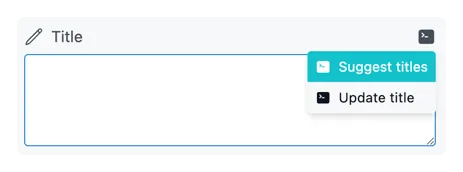
Sample scripts
Section titled “Sample scripts”Update title by Ollama AI
Section titled “Update title by Ollama AI”The following script will update the title field value with a title generated by the Ollama AI.
import { FieldAction } from '@frontmatter/extensibility';import ollama from 'ollama';
(async () => {  const { frontMatter } = FieldAction.getArguments();
  if (!frontMatter.title) {    FieldAction.done();    return;  }
  const ollamaResp = await ollama.chat({    model: 'llama3',    messages: [{      role: 'user',      content: `Create a SEO friendly title based on the given placeholder title. The title should be catchy and should contain the main keywords. The title should not exceed 60 characters in length. Desired format: just a string, e.g. "My first blog post" and you should not include anything else than the title.
The current placeholder title is: """${frontMatter.title}"""`    }],    stream: false  });
  let title = ollamaResp.message.content;
  if (!title) {    FieldAction.done();    return;  }
  if (title.startsWith('"') && title.endsWith('"')) {    title = title.slice(1, -1);  }
  FieldAction.update(title);})();
Prerequisites
Section titled “Prerequisites”- Running Ollama instance
npm i ollama
Configuration
Section titled “Configuration”{ "frontMatter.taxonomy.contentTypes": [{ "name": "sample", "fields": [{ "title": "Title", "name": "title", "type": "string", "required": true, "actions": [{ "title": "Update title by Ollama AI", "script": "./scripts/fields/update-title.mjs", "command": "~/.nvm/versions/node/v20.11.1/bin/node" }] }}Suggest titles by Ollama AI
Section titled “Suggest titles by Ollama AI”Similar to the previous script, this script will suggest multiple titles generated by the Ollama AI and you can choose one of them to update the title field value.
Info
The script makes use of the
askQuestionsmethod which allows you to ask the user to choose from a list of options.
import { FieldAction } from '@frontmatter/extensibility';import ollama from 'ollama';
(async () => {  const { frontMatter, answers } = FieldAction.getArguments();
  if (!answers) {    if (!frontMatter.title) {      FieldAction.done();      return;    }
    const ollamaResp = await ollama.chat({      model: 'llama3',      messages: [{        role: 'user',        content: `Create a SEO friendly titles based on the given placeholder title. The titles should be catchy and should contain the main keywords. The titles should not exceed 60 characters in length.
Desired format: just a string wrapped in quotes, e.g. "My first blog post" and you should not include anything else than the title.
You should suggest at least 3 titles. Each suggestion is created on a new line.
The current placeholder title is: """${frontMatter.title}"""`      }],      stream: false    });
    let titles = ollamaResp.message.content;
    if (!titles) {      FieldAction.done();      return;    }
    titles = titles.split('\n')      .map(title => title.trim())      .filter(title => title && title.startsWith('"') && title.endsWith('"'))      .map(title => {        if (title.startsWith('"') && title.endsWith('"')) {          title = title.slice(1, -1);        }
        return title;      });
    FieldAction.askQuestions([{      name: "articleTitle",      message: "Choose the best title",      default: frontMatter.title,      options: [decodeURIComponent(frontMatter.title), ...titles]    }]);    return;  }
  if (!answers.articleTitle) {    FieldAction.done();    return;  }
  FieldAction.update(answers.articleTitle);})();
When the user triggers the field action, the script will ask the user to choose the best title from the suggestions it received from the Ollama AI.
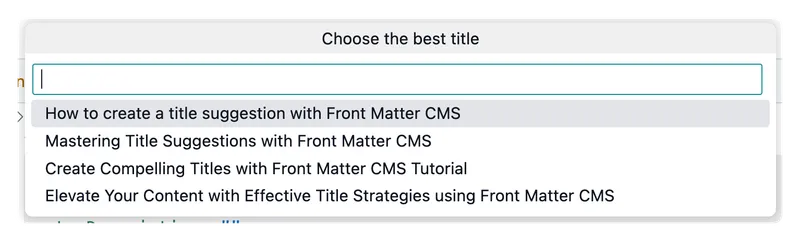
Prerequisites
Section titled “Prerequisites”- Running Ollama instance
npm i ollama
Configuration
Section titled “Configuration”{ "frontMatter.taxonomy.contentTypes": [{ "name": "sample", "fields": [{ "title": "Title", "name": "title", "type": "string", "required": true, "actions": [{ "title": "Suggest titles by Ollama AI", "script": "./scripts/fields/suggest-titles.mjs", "command": "~/.nvm/versions/node/v20.11.1/bin/node" }] }}