
Settings overview
Here you can find an overview of all available settings.
Available settings
Section titled “Available settings”frontMatter.logging
Section titled “frontMatter.logging”Specify the logging level you want to use for the extension.
- Type:
string - Default:
info
Options:
verboseinfowarningerror
Info
More information on how to use it can be found in the troubleshooting - logging section.
frontMatter.config.dynamicFilePath
Section titled “frontMatter.config.dynamicFilePath”Allows you to specify a dynamic config file path which will be used during the initialization of the extension. You can, for instance, use it to dynamically set the path of the preview host.
- Type:
string - Default:
""
Info
More information on how to use it can be found in the extending settings with code section.
frontMatter.content.autoUpdateDate
Section titled “frontMatter.content.autoUpdateDate”Specify if you want to automatically update the modified date of your article/page.
- Type:
boolean - Default:
false
frontMatter.content.defaultFileType
Section titled “frontMatter.content.defaultFileType”Specify the default file type for the content to create.
- Type:
emum - Default:
md
Options:
mdmdx
For more information how and when this is used, check content creation
frontMatter.content.defaultSorting
Section titled “frontMatter.content.defaultSorting”Specify the default sorting option for the content dashboard. You can use one of the values from the enum or define your own ID.
- Type:
string - Default:
""
Options:
- LastModifiedAsc
- LastModifiedDesc
- FileNameAsc
- FileNameDesc
- PublishedAsc
- PublishedDesc
ID of your custom sorting option
frontMatter.content.draftField
Section titled “frontMatter.content.draftField”Define the draft field you want to use to manage your content.
-
Type:
object- name: Define the type of field
- type:
booleanorchoice - invert:
trueif you want to invert the value. This inversion is only applied if the field is a boolean field and can be used to change the draft to published content behaviou. - choices: Define the choices of the draft field
string[]
-
Default:
{ "name": "draft", "type": "boolean"}frontMatter.content.fmHighlight
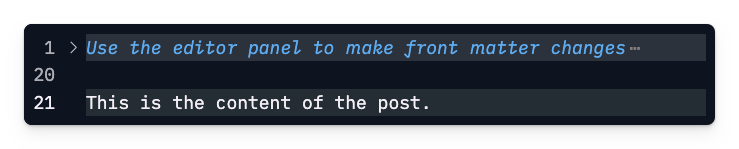
Section titled “frontMatter.content.fmHighlight”Specify if you want to highlight the Front Matter in the Markdown file.
- Type:
boolean - Default:
true
frontMatter.content.grouping
Section titled “frontMatter.content.grouping”Specify the grouping options you want to use for your content dashboard.
- Type:
{ title: string; name: string; }[] - Default:
[]
frontMatter.content.hideFm
Section titled “frontMatter.content.hideFm”Specify if you want to hide the Front Matter in the Markdown file.
- Type:
boolean - Default:
false
frontMatter.content.hideFmMessage
Section titled “frontMatter.content.hideFmMessage”Specify the message to display when the Front Matter is hidden.
- Type:
string - Default:
""
frontMatter.content.i18n
Section titled “frontMatter.content.i18n”Specify the locales for the entire workspace.
- Type:
object[] - Default:
[]
Info
More information on how to use it can be found in the multilingual section.
frontMatter.content.pageFolders
Section titled “frontMatter.content.pageFolders”This array of folders defines where the extension can find your content and create new content by running the create article command.
- Type:
object[] - Default:
[]
Info
More information on how to use it can be found in the content folders section.
frontMatter.content.placeholders
Section titled “frontMatter.content.placeholders”Allows you to specify custom placeholders to use in your content creation process.
- Type:
object[] - Default:
[]
Properties:
id: The id of the placeholdervalue: The value of the placeholder
Info
More information on how you can use it can be found here: placeholders.
frontMatter.content.publicFolder
Section titled “frontMatter.content.publicFolder”Specify the folder name where all your assets are located. For instance in Hugo this is the static
folder.
- Type:
stringorobject - Default:
""
Info
More information on how to use it can be found in the media dashboard section.
frontMatter.content.filters
Section titled “frontMatter.content.filters”Specify the filters you want to use for your content dashboard.
- Type:
object[] - Default:
["contentFolders", "tags", "categories"]
Info
More information on how to use it can be found in the Content View - Filters section.
frontMatter.content.sorting
Section titled “frontMatter.content.sorting”Define the sorting options for your dashboard content.
- Type:
object[] - Default:
[]
Info
More information on how to use it can be found in the Content View - Sorting section.
frontMatter.content.supportedFileTypes
Section titled “frontMatter.content.supportedFileTypes”Specify the file types that you want to use in Front Matter.
- Type:
array - Default:
[md, mdx, markdown]
frontMatter.content.wysiwyg
Section titled “frontMatter.content.wysiwyg”Specifies if you want to enable/disable the What You See, Is What You Get (WYSIWYG) markdown controls.
- Type:
boolean - Default:
true
frontMatter.contentHealth.enabled
Section titled “frontMatter.contentHealth.enabled”Enable or disable the Content Health section in the editor panel.
- Type:
boolean - Default:
true
frontMatter.contentHealth.checkExternalLinks
Section titled “frontMatter.contentHealth.checkExternalLinks”Enable external link validation in Content Health.
When enabled, Front Matter performs HTTP HEAD requests for external URLs. This can slow down panel
updates for articles with many external links.
- Type:
boolean - Default:
false
frontMatter.contentHealth.freshnessThreshold
Section titled “frontMatter.contentHealth.freshnessThreshold”Define after how many days content should be flagged as stale in Content Health.
Set this to 0 to disable freshness warnings.
- Type:
number - Default:
180
frontMatter.contentHealth.minReadability
Section titled “frontMatter.contentHealth.minReadability”Define the minimum Flesch Reading Ease score (0-100) before Content Health shows a readability warning.
Set this to 0 to disable readability threshold warnings.
- Type:
number - Default:
0
frontMatter.custom.scripts
Section titled “frontMatter.custom.scripts”Specify the path to a Node.js script to execute. The current file path will be provided as an argument.
- Type:
object[] - Default:
[]
Sample:
{ "frontMatter.custom.scripts": [ { "title": "Generate social image", "script": "./scripts/social-img.js", "nodeBin": "~/.nvm/versions/node/v14.15.5/bin/node" } ]}Info
Check the create your own custom scripts section for more information.
frontMatter.copilot.enabled
Section titled “frontMatter.copilot.enabled”Specify if you want to enable GitHub Copilot AI suggestions. This requires the GitHub Copilot extension to be installed.
- Type:
boolean - Default:
true
Info
More information on how to use it can be found in the AI features section.
frontMatter.copilot.family
Section titled “frontMatter.copilot.family”Specify the LLM family of the GitHub Copilot model you want to use for your project.
- Type:
string - Default:
gpt-5-mini
Info
More information on how to use it can be found in the AI features section.
frontMatter.dashboard.content.cardTags
Section titled “frontMatter.dashboard.content.cardTags”Specify the name of the metadata field that will be used to show the tags on the content card. When empty or null, it will hide the tags from the card.
- Type:
string - Default:
tags
Info
Check the card tags section for more information.
frontMatter.dashboard.content.card.fields.date
Section titled “frontMatter.dashboard.content.card.fields.date”Specify if you want to show the date on the content card view.
- Type:
boolean - Default:
true
frontMatter.dashboard.content.card.fields.description
Section titled “frontMatter.dashboard.content.card.fields.description”Specify the name of the metadata field that will be used to show the description on the content card.
When empty or null, it uses the description field.
- Type:
string - Default:
""
frontMatter.dashboard.content.card.fields.state
Section titled “frontMatter.dashboard.content.card.fields.state”Specify if you want to show the state on the content card view.
- Type:
boolean - Default:
true
frontMatter.dashboard.content.card.fields.title
Section titled “frontMatter.dashboard.content.card.fields.title”Specify the name of the metadata field that will be used to show the title on the content card. When
empty or null, it uses the title field.
- Type:
string - Default:
""
frontMatter.dashboard.content.pagination
Section titled “frontMatter.dashboard.content.pagination”Specify if you want to enable/disable pagination for your content.
- Type:
booleanornumber - Default:
true - Maximum:
52
frontMatter.dashboard.content.defaults
Section titled “frontMatter.dashboard.content.defaults”Configure the default opening state of the contents dashboard, including sorting, grouping, and filters.
- Type:
object - Default:
{}
Properties:
sorting: The default sorting option for the contents dashboard. Use a built-in sort ID likeLastModifiedDescor a custom sorting option ID fromfrontMatter.content.sorting.grouping: The default grouping for the contents dashboard. UseYear,Draft,None, or a custom grouping field name fromfrontMatter.content.grouping.filters: The default filter values for the contents dashboard. Keys can becontentFolders,tags,categories, or the name of a custom filter.
{ "frontMatter.dashboard.content.defaults": { "sorting": "LastModifiedDesc", "grouping": "Year", "filters": { "contentFolders": "docs", "tags": "release", "categories": "guides", "fmContentType": "documentation" } }}Info
These defaults are applied to the contents dashboard when it opens, making it easier to start from a preferred view.
frontMatter.dashboard.openOnStart
Section titled “frontMatter.dashboard.openOnStart”Specify if you want to open the dashboard when you start VS Code.
- Type:
boolean | null - Default:
null
frontMatter.data.files
Section titled “frontMatter.data.files”Specify the data files you want to use for your website.
- Type:
array - Default: “
More information on how to use it can be found in the data files view section.
frontMatter.data.folders
Section titled “frontMatter.data.folders”Specify the data files you want to use for your website.
- Type:
array - Default: “
More information on how to use it can be found in the data files view section.
frontMatter.data.types
Section titled “frontMatter.data.types”Specify the data types. These types can be used in for your data files.
- Type:
array - Default: “
More information on how to use it can be found in the data files view section.
frontMatter.extensibility.scripts
Section titled “frontMatter.extensibility.scripts”Specify the list of scripts to load in the Front Matter CMS.
- Type:
array<string> - Default:
[]
Info
More information on how to use it can be found in the UI extensibility section.
frontMatter.experimental
Section titled “frontMatter.experimental”Specify if you want to enable the experimental features.
- Type:
boolean - Default:
false
Info
More information on how to use it can be found in the experimental features section.
frontMatter.extends
Section titled “frontMatter.extends”Specify the list of paths/URLs to extend the Front Matter CMS config.
- Type:
array<string> - Default:
[]
Info
More information on how to use it can be found in the extending settings section.
frontMatter.file.preserveCasing
Section titled “frontMatter.file.preserveCasing”Specify if you want to preserve the casing of your file names from the title.
- Type:
boolean - Default:
false
Info
More information on how to use it can be found in the preserve the casing for your file names section.
frontMatter.file.slugSeparator
Section titled “frontMatter.file.slugSeparator”Specify the separator character used between words when generating slugs and file names from titles.
- Type:
string - Default:
-
frontMatter.framework.id
Section titled “frontMatter.framework.id”Specify the ID of your static site generator or framework you are using for your website.
- Type:
string - Default:
""
frontMatter.framework.startCommand
Section titled “frontMatter.framework.startCommand”Specify the command you want to use to start your static site generator or framework.
- Type:
string - Default:
null(when using a known framework, it will be set automatically)
frontMatter.git.enabled
Section titled “frontMatter.git.enabled”Specify if you want to use the Git actions for your website.
- Type:
boolean - Default:
false
frontMatter.git.commitMessage
Section titled “frontMatter.git.commitMessage”Specify the commit message you want to use for the sync.
- Type:
string - Default:
Synced by Front Matter
frontMatter.git.disableOnBranches
Section titled “frontMatter.git.disableOnBranches”Specify the branches on which you want to disable the Git actions.
- Type:
array - Default:
[]
frontMatter.git.requiresCommitMessage
Section titled “frontMatter.git.requiresCommitMessage”Specify the branches on which you want to require a commit message.
- Type:
array - Default:
[]
frontMatter.git.submodule.push
Section titled “frontMatter.git.submodule.push”Specify if you want to push the submodule changes to the remote repository.
- Type:
boolean - Default:
false
frontMatter.git.submodule.pull
Section titled “frontMatter.git.submodule.pull”Specify if you want to pull the submodule changes from the remote repository.
- Type:
boolean - Default:
false
frontMatter.git.submodule.branch
Section titled “frontMatter.git.submodule.branch”Specify the branch to use for the submodule. This will be the branch Front Matter CMS will try to checkout and sync.
- Type:
string - Default:
""
frontMatter.git.submodule.folder
Section titled “frontMatter.git.submodule.folder”Specify the folder where the submodule is located. This is handy when you have multiple submodules.
- Type:
string - Default:
""
frontMatter.global.activeMode
Section titled “frontMatter.global.activeMode”Specify the activated mode of Front Matter.
- Type:
string, null
Info
Check the view mode documentation section for more information.
frontMatter.global.modes
Section titled “frontMatter.global.modes”Specify the modes you want to use for Front Matter.
- Type:
array - Default: “
Info
Check the view mode documentation section for more information.
frontMatter.global.disabledNotifications
Section titled “frontMatter.global.disabledNotifications”This is an array with the notifications types that can be disabled for Front Matter CMS.
- Type:
array<string> - Default:
[] - Options:
requiredFieldValidation
frontMatter.global.notifications
Section titled “frontMatter.global.notifications”Specifies which type of notifications you want to see or which you want to hide.
- Type:
array<string> - Default:
["info", "warning", "error"]
frontMatter.global.timezone
Section titled “frontMatter.global.timezone”Specify the timezone you want to use for your date formatting.
- Type:
string - Default:
UTC
frontMatter.media.contentTypes
Section titled “frontMatter.media.contentTypes”Specify the content types you want to use for your media files.
- Type:
array - Default: “
Info
More information on how to use it can be found in the media content types section.
frontMatter.media.defaultSorting
Section titled “frontMatter.media.defaultSorting”Specify the default sorting option for the media dashboard.
- Type:
string - Default:
""
Options:
- LastModifiedAsc
- LastModifiedDesc
- FileNameAsc
- FileNameDesc
frontMatter.media.pasteBehavior
Section titled “frontMatter.media.pasteBehavior”Specify what happens when you paste an image into a content file.
- Type:
string - Default:
dashboard
Options:
dashboard: Open the media dashboard to pick the folder and fill in the metadata before inserting.auto: Save the image to the page bundle or public folder and insert it straight away.disabled: Let Visual Studio Code handle the paste.
Info
More information on how to use it can be found in the pasting images section.
frontMatter.media.pasteFileName
Section titled “frontMatter.media.pasteFileName”Specify the file name to use for pasted images, without the extension. The {filename}, {date},
and {time} placeholders are supported.
- Type:
string - Default:
image-{date}-{time}
Info
More information on how to use it can be found in the pasting images section.
frontMatter.media.pasteFolder
Section titled “frontMatter.media.pasteFolder”Specify the folder to store pasted images in. The path is relative to your workspace and supports the
[[workspace]] placeholder. When left empty, the page bundle folder or the public folder is used.
- Type:
string - Default:
""
Info
More information on how to use it can be found in the pasting images section.
frontMatter.media.supportedMimeTypes
Section titled “frontMatter.media.supportedMimeTypes”Specify the mime types to support for the media files.
- Type:
array - Default:
image/*, video/*, audio/*
frontMatter.panel.actions.disabled
Section titled “frontMatter.panel.actions.disabled”Specify the actions you want to disable in the panel.
- Type:
array<string> - Default:
[]
Options:
openDashboardcreateContentoptimizeSlugpreviewopenOnWebsitestartStopServercustomActions
frontMatter.panel.freeform
Section titled “frontMatter.panel.freeform”Specifies whether the tag picker should allow unknown tags and categories. When enabled, you can enter new values and save them afterward.
- Type:
boolean - Default:
true
Info
This setting also controls front matter validation for
tagsandcategories. When freeform is enabled (the default), values that are not part of your known taxonomy are allowed and will not be flagged as validation errors. When disabled, the generated schema restricts these fields to the known taxonomy values.
frontMatter.panel.openOnSupportedFile
Section titled “frontMatter.panel.openOnSupportedFile”Specifies if you want to open the panel when opening a supported file.
- Type:
boolean - Default:
false
frontMatter.preview.host
Section titled “frontMatter.preview.host”Specify the host URL (example: http://localhost:1313) to be used when opening the preview.
- Type:
string - Default:
""
frontMatter.preview.pathName
Section titled “frontMatter.preview.pathName”Specify the path you want to add after the host and before your slug. This can be used for instance
to include the year/month like: {{date\|yyyy-MM}}. The date will be generated based on the article
its date field value.
- Type:
string - Default:
""
frontMatter.preview.trailingSlash
Section titled “frontMatter.preview.trailingSlash”Specify if you want to add a trailing slash to the preview URL.
- Type:
boolean - Default:
false
frontMatter.projects
Section titled “frontMatter.projects”Allows you to specify a list of projects you want to manage with Front Matter CMS. Each project can override the global configuration.
- Type:
array<project> - Default:
[]
Info
More information on how to use it can be found in the projects section.
frontMatter.site.baseURL
Section titled “frontMatter.site.baseURL”Specify the base URL of your site, this will be used for SEO checks.
- Type:
string - Default:
""
Info
Example for this site it would be:
https://frontmatter.codes.
frontMatter.snippets.wrapper.enabled
Section titled “frontMatter.snippets.wrapper.enabled”Specify if you want to enable/disable the snippet wrapper functionality.
- Type:
boolean - Default:
true
Info
More information on how to use it can be found in the snippet wrapper section.
frontMatter.taxonomy.alignFilename
Section titled “frontMatter.taxonomy.alignFilename”Align the filename with the new slug when it gets generated.
- Type:
boolean - Default:
false
frontMatter.taxonomy.categories
Section titled “frontMatter.taxonomy.categories”Specifies the categories which can be used in the Front Matter.
- Type:
string[] - Default:
[]
Important
Tags and categories are now moved to a separate database file (
.frontmatter/database/taxonomyDb.json). The setting can still be used to predefine the categories. Once the project gets initialized, the tags will be moved to the database file.
frontMatter.taxonomy.commaSeparatedFields
Section titled “frontMatter.taxonomy.commaSeparatedFields”Specify the fields names that Front Matter should treat as a comma-separated array.
- Type:
string[] - Default:
[] - Example:
["tags", "categories"]
Info
As some site generators expect arrays in
YAMLto be comma-separated like Pelican. You can use this setting to define which of the front matter properties should be treated as an comma-separated array.
frontMatter.taxonomy.contentTypes
Section titled “frontMatter.taxonomy.contentTypes”Specify the type of contents you want to use for your articles/pages/etc. Make sure the type is
correctly set in your front matter.
- Type:
array, null - Default: check default content type
frontMatter.taxonomy.customTaxonomy
Section titled “frontMatter.taxonomy.customTaxonomy”Specify the custom taxonomy field data.
- Type:
array[object] - Default:
[]
Sample:
"frontMatter.taxonomy.customTaxonomy": [ { "id": "customTaxonomy", "options": [ "Option 1", "Option 2", "Option 3" ] } ]Info
Check the custom taxonomy section for more information.
frontMatter.taxonomy.dateFormat
Section titled “frontMatter.taxonomy.dateFormat”Specify the date format for your articles. Check date-fns formating for more information.
- Type:
string - Default:
iso
frontMatter.taxonomy.fieldGroups
Section titled “frontMatter.taxonomy.fieldGroups”Define the field groups you want to use for your block fields.
- Type:
array[object] - Default:
[]
More information on how to use this setting can be found on the block field section of content creation.
frontMatter.taxonomy.frontMatterType
Section titled “frontMatter.taxonomy.frontMatterType”Specify which Front Matter language you want to use. The extension supports YAML (default),
TOML, and JSON.
- Type:
enum: YAML | TOML | JSON - Default:
YAML
frontMatter.taxonomy.indentArrays
Section titled “frontMatter.taxonomy.indentArrays”Specify if arrays in front matter of the markdown files are indented.
- Type:
boolean - Default:
true
frontMatter.taxonomy.noPropertyValueQuotes
Section titled “frontMatter.taxonomy.noPropertyValueQuotes”Specify the property names of which you want to remove the quotes in the output value. Warning: only use this when you know what you are doing. If you’re going to, for instance, remove the quotes from the date property, you can add the following:
{ "frontMatter.taxonomy.noPropertyValueQuotes": ["date"]}- Type:
string[] - Default:
[]
frontMatter.taxonomy.seoContentLengh
Section titled “frontMatter.taxonomy.seoContentLengh”Specifies the optimal minimum length for your articles. Between 1,760 words – 2,400 is the absolute
ideal article length for SEO in 2021. (set to -1 to turn it off).
- Type:
number - Default:
1760
frontMatter.taxonomy.seoDescriptionField
Section titled “frontMatter.taxonomy.seoDescriptionField”Specifies the name of the SEO description field for your page.
- Type:
string - Default:
description
Important
if you would use another field in your content types, be sure to remap this setting.
frontMatter.taxonomy.seoDescriptionLength
Section titled “frontMatter.taxonomy.seoDescriptionLength”Specifies the optimal description length for SEO (set to -1 to turn it off).
- Type:
number - Default:
160
frontMatter.taxonomy.seoSlugLength
Section titled “frontMatter.taxonomy.seoSlugLength”Specifies the optimal slug length for SEO (set to -1 to turn it off).
- Type:
number - Default:
75
frontMatter.taxonomy.seoTitleField
Section titled “frontMatter.taxonomy.seoTitleField”Specifies the name of the SEO title field for your page.
- Type:
string - Default:
title
frontMatter.taxonomy.seoTitleLength
Section titled “frontMatter.taxonomy.seoTitleLength”Specifies the optimal title length for SEO (set to -1 to turn it off).
- Type:
number - Default:
60
frontMatter.taxonomy.slugPrefix
Section titled “frontMatter.taxonomy.slugPrefix”Specify a prefix for the slug.
- Type:
string - Default:
""
frontMatter.taxonomy.slugSuffix
Section titled “frontMatter.taxonomy.slugSuffix”Specify a suffix for the slug.
- Type:
string - Default:
""
frontMatter.taxonomy.slugTemplate
Section titled “frontMatter.taxonomy.slugTemplate”Specify the template for the slug.
- Type:
string - Default: “
Info
More information on how to use it can be found in the slug section.
frontMatter.taxonomy.tags
Section titled “frontMatter.taxonomy.tags”Specifies the tags which can be used in the Front Matter.
- Type:
string[] - Default:
[]
Important
Tags and categories are now moved to a separate database file (
.frontmatter/database/taxonomyDb.json). The setting can still be used to predefine the tags. Once the project gets initialized, the tags will be moved to the database file.
frontMatter.taxonomy.quoteStringValues
Section titled “frontMatter.taxonomy.quoteStringValues”Specify if you always want to wrap string values in quotes.
- Type:
boolean - Default:
false
frontMatter.telemetry.disable
Section titled “frontMatter.telemetry.disable”Specify if you want to disable the telemetry.
Important
No user data is tracked, we only use telemetry to see what is used, and what isn’t. This allows us to make accurate decisions on what to add or enhance to the extension.
- Type:
boolean - Default:
false
frontMatter.templates.enabled
Section titled “frontMatter.templates.enabled”Specify if you want to use templates functionality.
- Type:
boolean - Default:
false
frontMatter.templates.folder
Section titled “frontMatter.templates.folder”Specify the folder to use for your article templates.
- Type:
string - Default:
.frontmatter/templates
Important
In version 5 of Front Matter, we moved the default location from
.templatesto.frontmatter/templates.
frontMatter.templates.prefix
Section titled “frontMatter.templates.prefix”Specify the prefix you want to add for your new article filenames.
- Type:
string - Default:
{{date|yyyy-MM-dd}}
frontMatter.validation.enabled
Section titled “frontMatter.validation.enabled”Specify if you want to enable front matter validation. When enabled, the extension validates your front matter against the active content type schema.
- Type:
boolean - Default:
true
frontMatter.website.host
Section titled “frontMatter.website.host”Specify the host URL of your website.
- Type:
string - Default:
""
Deprecated settings
Section titled “Deprecated settings”Removed settings
Section titled “Removed settings”frontMatter.content.folders
Section titled “frontMatter.content.folders”This setting has been deprecated since version 3.1.0 in favour of the newly introduced
frontMatter.content.pageFolders setting.
frontMatter.dashboard.mediaSnippet
Section titled “frontMatter.dashboard.mediaSnippet”This setting is deprecated in version 7.3.0 and and will be removed in the next major version.
Please define your media snippet in the frontMatter.content.snippets setting.
frontMatter.taxonomy.dateField
Section titled “frontMatter.taxonomy.dateField”This setting is used to define the publishing date field of your articles.
- Type:
string - Default:
date
Important
Use the new
isPublishDatedatetime field setting for content types instead.
frontMatter.taxonomy.modifiedField
Section titled “frontMatter.taxonomy.modifiedField”This setting is used to define the modified date field of your articles.
- Type:
string - Default:
lastmod
Important
Use the new
isModifiedDatedatetime field setting for content types instead.
frontMatter.sponsors.ai.enabled
Section titled “frontMatter.sponsors.ai.enabled”This setting was removed in version 10.10.0. Sponsor AI functionality has been discontinued.
- Type:
boolean - Default:
false
Info
This setting was previously used to enable AI suggestions for sponsors. It is no longer supported.